A Weekly Review That Takes Less Guesswork
A short weekly review can bring commitments, priorities and spare capacity into view without turning Sunday evening into an administrative shift.
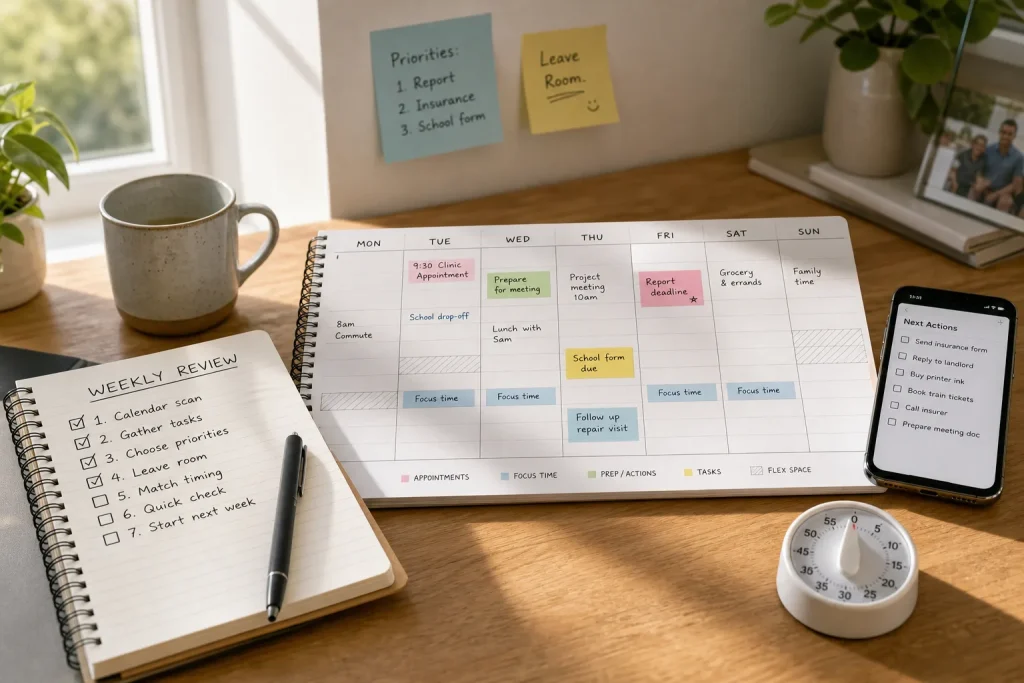
A short weekly review can bring commitments, priorities and spare capacity into view without turning Sunday evening into an administrative shift.
Lifestyle · 6 min read
On Sunday evening, a dentist appointment sits in one calendar, a work deadline in another, and a message about a school form waits several screens away. A useful weekly review brings those loose ends into one view, then makes a few decisions before Monday gets involved.
Keep the routine short and repeatable. A calendar, a place to capture tasks, and a timer are enough. The aim is not to predict every interruption; it is to notice what is already coming, choose what deserves attention, and avoid filling every open space.
1. Set a small boundary around the review
Choose a regular time and a modest limit, such as a quiet part of Sunday afternoon or the first part of Monday morning. Set a timer so the review does not expand to absorb the evening. If the timer rings while a few items remain, record them for later rather than opening a new planning project.
Use the same basic tools each time. A paper planner and pencil work well; so do a digital calendar and one task list. Switching between several apps to find the perfect system is a fine way to spend the review without reviewing anything.
A fixed boundary makes the routine easier to restart after a busy week. It also gives the review a clear job: prepare the coming days, not redesign your entire life.
2. Scan the calendar before adding tasks
Look across the coming week, including evenings and any shared family calendar you rely on. Check appointments, travel time, school or care responsibilities, deadlines, and events that require preparation. Confirm the location or format where that detail could cause confusion.
Then note what each commitment requires before it happens. An appointment may need a document, a ride, or a reminder to leave. A meeting may need a short preparation block. Put those actions on the task list or directly beside the calendar event, whichever is more likely to be seen.
This order matters. If you begin by choosing tasks, you may plan as though every weekday were a blank sheet. The calendar is often less poetic.
3. Gather loose tasks into one place
Check the places where unfinished work tends to hide: notes on your phone, a paper pad, flagged messages, and any list you already use. Move genuine next actions into one trusted list. A next action should describe something you can do, such as “reply to the landlord about the repair time,” rather than a vague topic like “apartment.”
Do not copy every message or idea. Some are reference material, some are no longer relevant, and some are reminders that can be deleted once their purpose is clear. If an item has no action attached, decide whether it belongs in a calendar, a reference file, or nowhere at all.
Consolidating tasks reduces the chance that a request will stay invisible simply because it landed in an unfamiliar inbox. It also gives you a more honest view of the work competing for attention.
4. Choose a few priorities for the week
Review the combined calendar and task list, then choose a small number of outcomes that would make the week feel usefully directed. Favor work with a real deadline, a meaningful consequence, or a clear connection to a longer-term responsibility. A priority is not merely the loudest item or the one with the most dramatic subject line.
Make each priority concrete. “Sort out insurance” could become “send the missing form” or “call the insurer to ask what document is needed.” Clear wording makes it easier to begin and easier to recognize when the task is finished.
Keep the rest of the list available without pretending it all fits into the week. The distinction between important and merely present is not always comfortable, but it is useful. A task can remain valid without being scheduled immediately.
5. Leave visible room for unexpected work
Do not assign every open block to a task. Leave some unscheduled time across the week for a delayed appointment, a request that needs a quick answer, or ordinary fatigue. If the week contains fixed shifts or care duties, spare capacity may be a small gap rather than a broad afternoon. The point is to make room where your real schedule permits it.
When a new task arrives, compare it with the priorities already chosen. If it truly must happen soon, decide what will move. If nothing can move, the plan may be overloaded, and that is information rather than a personal failing. Put the task in a later slot or ask for help or a revised deadline when appropriate.
Leaving space is not the same as doing nothing. It is a practical way to stop one surprise from making the rest of the plan fictional.
6. Match important tasks to workable moments
Place tasks on the calendar only when timing matters or a specific block will help. A call that can happen only during office hours needs a suitable window. A focused writing task may benefit from a quieter part of the day. Minor errands can stay on the list until you know which route or gap makes sense.
Estimate tasks in ordinary language rather than trying to calculate an exact duration. Mark something as a short call, a focused session, or an errand that needs travel. If a task repeatedly spills beyond its allotted space, give it a more realistic block next time or break it into smaller actions.
Keep adjacent commitments in mind. A task that requires calm attention may not fit neatly between a commute and a scheduled call, even if the calendar says there is room. Calendars record time; they do not supply concentration.
7. End with a quick check and a clear starting point
Before stopping, look once more at the week as a whole. Check that appointments have the details you need, priorities have a plausible place, and some capacity remains unclaimed. Remove duplicate reminders and move anything that clearly belongs in a later week.
Choose one opening action for the first work period: pack the form, send the reply, or open the document and write the next section. Put that action somewhere you will see it. A small, visible starting point can make the first hour less dependent on remembering what Sunday-you intended.
Hypothetical worked example: a crowded Tuesday
Imagine that Maya begins her review with a week containing a Tuesday clinic appointment, a Friday report deadline, a school form due soon, and a message asking her to arrange a repair visit. She has one task list, a personal calendar, and a shared family calendar. Her available evenings are already committed to family routines, so she cannot treat them as spare work time.
She checks both calendars, adds the clinic location and travel reminder, and notes that the report needs a focused work block before Friday. She turns the school form into a specific task and adds a daytime call to arrange the repair. She chooses the report and form as the week’s main outcomes, then leaves an open work period rather than assigning it another project.
If the repair appointment is offered during that open period, she can accept it and shift the report block to another workable time. The tradeoff is that an optional task may wait. The expected result is a plan that reflects fixed commitments while still having somewhere for a real interruption to land.
A weekly review earns its keep when it changes what you do next: confirm the appointment, move one task, or protect a little open space. Stop once those decisions are clear. The remaining uncertainty can wait for the week itself.